Game Rig Tools (Blender Addon) - game-ready rigs in seconds

IMPORTANT TEMPORARY NOTE: This addon may not work in Blender 4.0 yet. We will make an announcement when our addons are fully updated for the latest Blender version. We are sorry for the inconvenience. Blender 4.0 was a major release, making many changes to Blender's API. Therefore, updating the addons requires careful testing. Thank you for your patience and understanding!
Disclaimer: This addon is available as a "pay-what-you-can product" on other online marketplaces. However, ArtStation does not support this pricing model. Therefore I have set the price to a recommended rate of $15. Please support our effort (and this great marketplace) by buying the addon here.
Would you like to export rigged and animated characters from Blender to Unreal(UE4 and UE5), Unity, Godot, and most other Game Engines?
Most Blender rigs are generally not fit for game development. However, in just a few clicks, Game Rig Tools can turn any Blender Armature into a Game-ready rig!
💥 NEW: A tool that rigs any character with a Mannequin-compatible rig. Details in this video:
Game Rig Tools can:
- save you a ton of time
- help you avoid pitfalls in your Blender to Game Engines Character workflow
To set the expectations right, this addon does not rig for you. Instead, it helps you Generate an optimized game-ready rig out of an existing Control Armature.
So, you can use your existing Blender rigs. Or download rigs. Or use Rigify - the free auto-rigging system.
Main Features
This addon has two main features:
- Generate a Deform Rig from an existing Control Rig
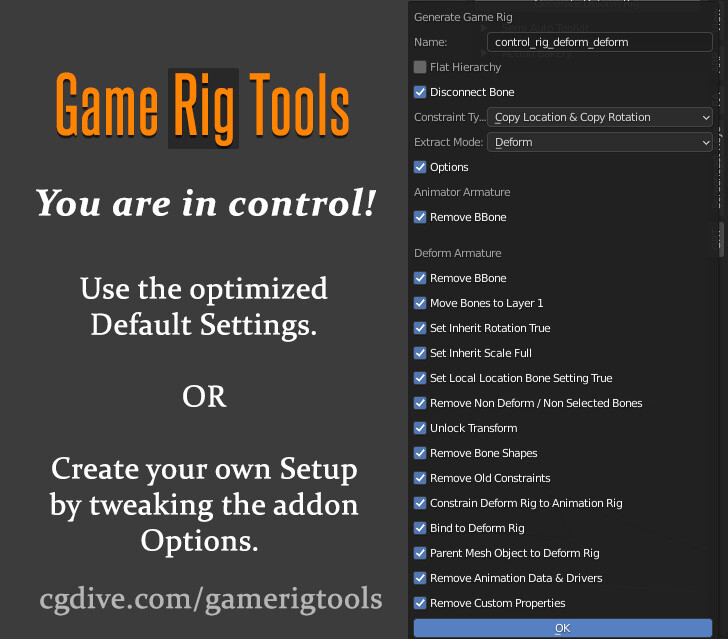
The addon can extract a Deform rig (a.k.a. Game Rig) from your Control Rig with a few clicks. The Deform rig can be easily exported to a Game Engine. It has an optimized number of bones, a proper bone hierarchy, and is free of scale problems (You'll learn more about these common issues below).
Game Rig Tools produces great results out of the box. However, the addon is highly customizable which allows you to adapt the Game rig to your needs.
- Action Bakery - easily bake Actions from the Control Rig to the Deform Rig
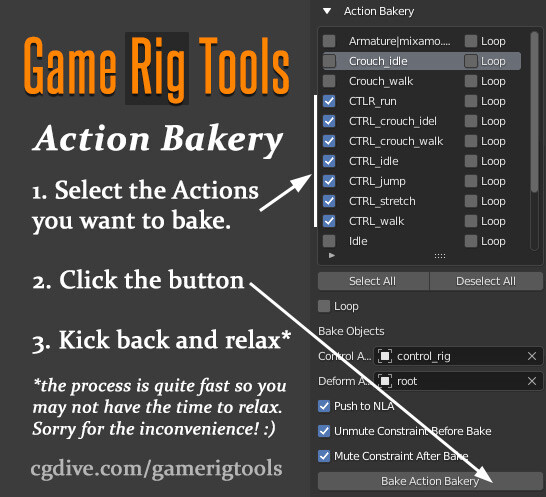
Having your armature split into Deform Rig and Control rig has a lot of benefits. However, one major drawback is that animations need to be "baked" to the Deform Rig before they can be exported out. Baking many actions by hand is time-consuming. Honestly, it's downright annoying.
Luckily the "Action Bakery" is part of Game Rig Tools. Just select all the Actions that you want to bake, click a button ... and relax while the addon does the work for you.
Blender Game Rig Tools addon - Action Baking
Additional Features
The add-on has additional features that will speed up your work and allow you to achieve advanced setups.
- Mute/Unmute constraints
Blender Game Rig Tools addon - constraints tool
While working with your Deform Rig, you may want to quickly enable or disable the connection to the Control Rig. These two buttons will allow you to do that with a single click.
- Semi-Auto Toolkit
A collection of useful tools for advanced constraints and rig clean-up. Each tool is explained in videos and a written manual which you'll find in the product files.
Learning Resources
In the product files, you'll find additional tutorials (videos/PDF) that demonstrate some of the most common workflows. Follow them and you'll be on your way to hassle-free game rigs.
Get help, report bugs, and suggest features
If you need help using the addon, we are there for you. Once you get the addon, you'll find links to our communications channels where you can ask for help, report bugs, and suggest features.
Digging Deeper
The add-on was designed to automatically address some of the most common problems for game-ready rigs. However, if you want to become a power user, I recommend that you try and understand the underlying issues and how Game Rig Tools is solving them.
Ready to become a power user? Please, read the brief summary and watch the additional videos I'll share below!
The Problems
Even experienced Blender riggers may not understand why their fancy rigs don't export well to Game Engines.
There are differences in the way Blender and Game Engines operate. Some of the main problems you'll encounter if you try to export a non-game-ready rig to a game engine are:
- bad bone hierarchy
- unnecessary bones that bloat your game data
- unpredictable deformations if a bone in the rig is scaled (which happens when you try to achieve squash & stretch effects)
The Solutions and how this Addon was born
I created manual solutions for the problems above and I shared video tutorials around my workflows. They worked great. However, they involved a lot of manual work and I lacked the Python skills to automated them.
Then, out of nowhere, Blenderboi - a very talented add-on developer - send me the initial version of Game Rig Tools, that he created based on my videos. After some back and forth, he tweaked the addon a bit and implemented the Action Bakery in record time. And now we are releasing it and we hope that everyone will benefit from it.
If you want to watch my earlier videos, I'll share them below. Do not focus on the manual solutions that I show since Game Rig Tools automates most of them. Just try to understand the underlying issues.
https://www.youtube.com/playlist?list=PLdcL5aF8ZcJvCyqWeCBYVGKbQgrQngen3
Release Notes
Blender 5.1 is officially supported. You'll find the most up-to-date files at the BOTTOM because Artstation's file reordering has been broken for a long time. :/